Main Lesson Plan
Main Lesson Plan / Activity Link: Remix of https://microbit.org/projects/make-it-code-it/frere-jacques-tune/
Supplies:
- V2 micro:bit per student / pair (if no micro:bits are available code and run on the provided simulator)
- Computer per micro:bit
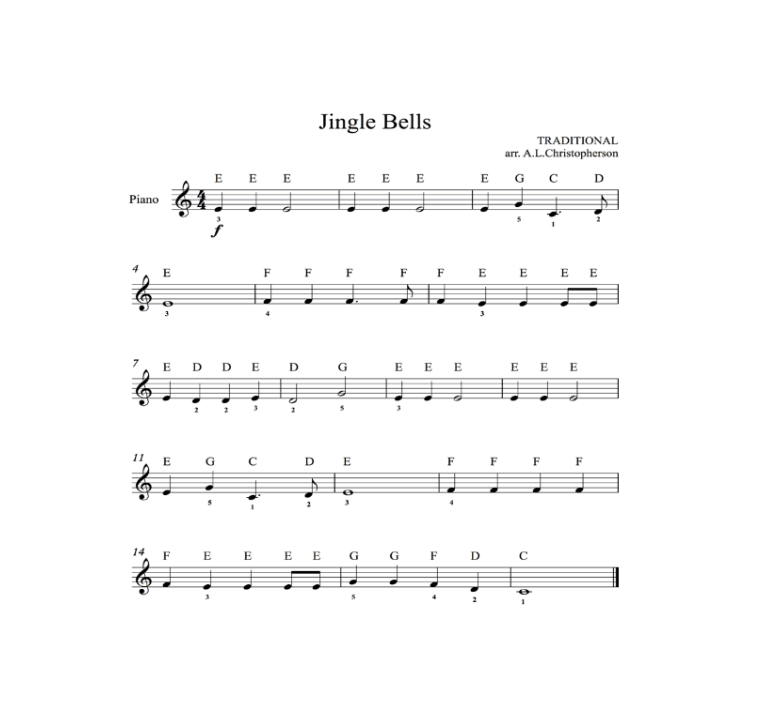
- Printouts of jingle bells or other holiday song sheet music (with notes) – example to right
Special Note: If Version 2 (V2) micro:bits are used, an external speaker/headphones are not required. If a Version 1 (V1) micro:bit is used, then an external speaker/headphones are required. Instructions for attaching headphones can be found here: https://microbit.org/projects/make-it-code-it/make-some-noise/
Main Lesson Plan / Activity Link: Remix of https://microbit.org/projects/make-it-code-it/frere-jacques-tune/
Supplies:
- V2 micro:bit per student / pair (if no micro:bits are available code and run on the provided simulator)
- Computer per micro:bit
- Printouts of jingle bells or other holiday song sheet music (with notes) – example to right
Special Note: If Version 2 (V2) micro:bits are used, an external speaker/headphones are not required. If a Version 1 (V1) micro:bit is used, then an external speaker/headphones are required. Instructions for attaching headphones can be found here: https://microbit.org/projects/make-it-code-it/make-some-noise/
Main Lesson Plan / Activity Link: Remix of https://microbit.org/projects/make-it-code-it/frere-jacques-tune/
Supplies:
- V2 micro:bit per student / pair (if no micro:bits are available code and run on the provided simulator)
- Computer per micro:bit
- Printouts of jingle bells or other holiday song sheet music (with notes) – example to right
Special Note: If Version 2 (V2) micro:bits are used, an external speaker/headphones are not required. If a Version 1 (V1) micro:bit is used, then an external speaker/headphones are required. Instructions for attaching headphones can be found here: https://microbit.org/projects/make-it-code-it/make-some-noise/
Tips for Running Activity
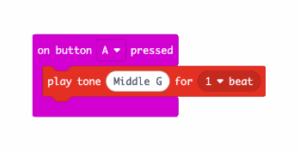
- Before jumping right into the jingle bell song, have students explore the music feature by asking students to code the micro:bit to play a note between middle C and high C when button A is pressed for 1 beat.
- Example Code:

- After students have mastered this code, give them a time limit to play around with creating their song with varying beat limits.
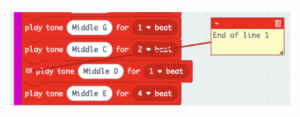
- Introduce students to using comments in the code, this allows students to describe choices made or identify specific sections of code for a later purpose:
- Example Code with Comments:

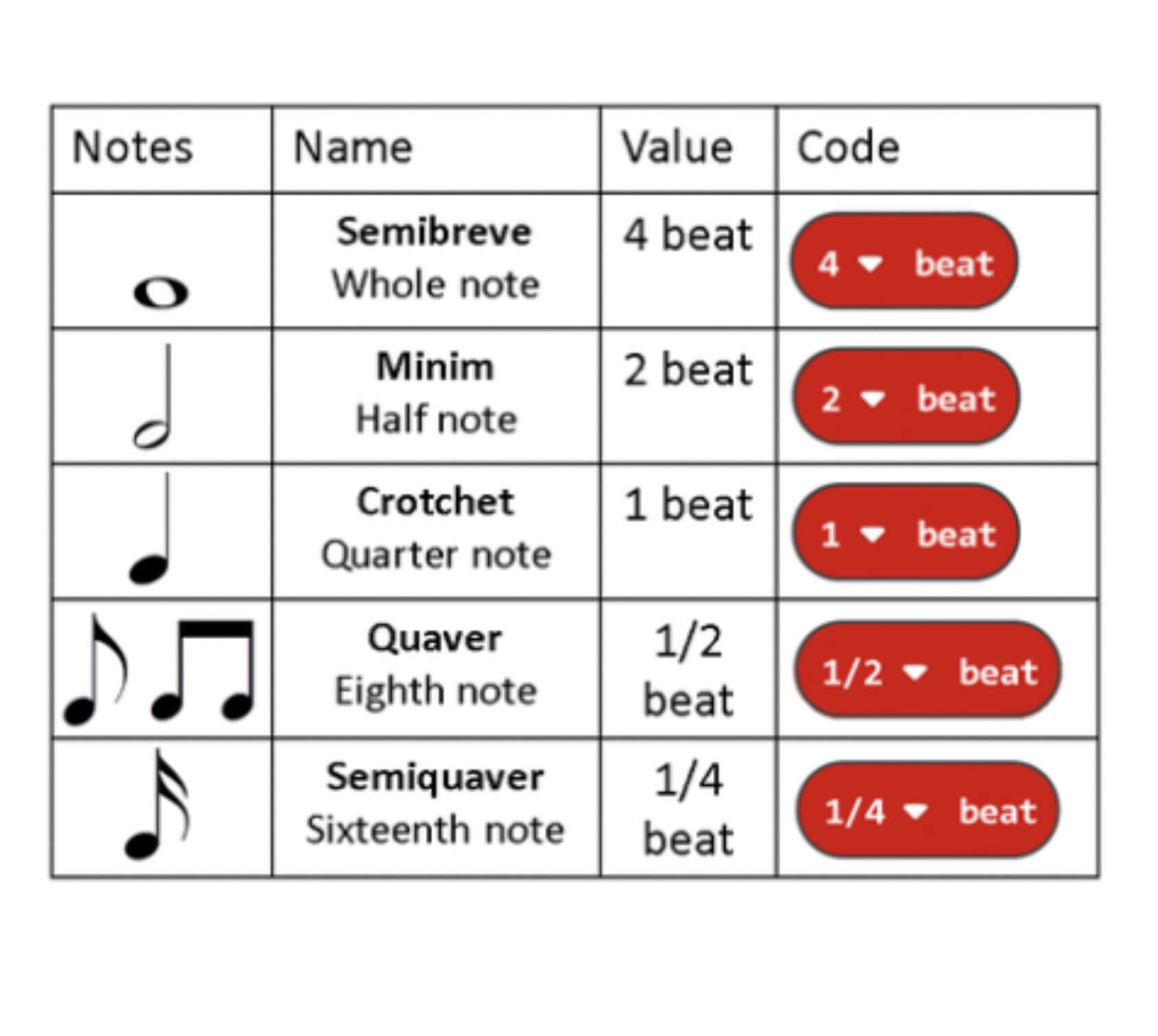
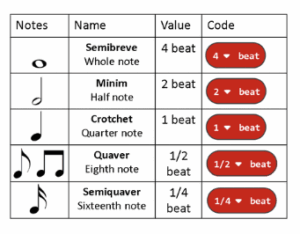
- This chart is helpful for knowing the timing of notes to beats:

- Before jumping right into the jingle bell song, have students explore the music feature by asking students to code the micro:bit to play a note between middle C and high C when button A is pressed for 1 beat.
- Example Code:

- Example Code:
- After students have mastered this code, give them a time limit to play around with creating their song with varying beat limits.
- Introduce students to using comments in the code, this allows students to describe choices made or identify specific sections of code for a later purpose:
- Example Code with Comments:

- Example Code with Comments:
- This chart is helpful for knowing the timing of notes to beats:

- Before jumping right into the jingle bell song, have students explore the music feature by asking students to code the micro:bit to play a note between middle C and high C when button A is pressed for 1 beat.
- Example Code:

- Example Code:
- After students have mastered this code, give them a time limit to play around with creating their song with varying beat limits.
- Introduce students to using comments in the code, this allows students to describe choices made or identify specific sections of code for a later purpose:
- Example Code with Comments:

- Example Code with Comments:
- This chart is helpful for knowing the timing of notes to beats:

Extension Opportunities
- Code an additional song to play on button “b”
- Have band students code a piece of music they’re playing in band
- Have each student code a different portion of the song, and synchronize their micro:bits for added difficulty
- Student Performance:
- Play student holiday music pieces during your class holiday party
- Deck the Hallways and share their music during passing periods over the intercom
- Go micro:bit “caroling” in the office
- Code an additional song to play on button “b”
- Have band students code a piece of music they’re playing in band
- Have each student code a different portion of the song, and synchronize their micro:bits for added difficulty
- Student Performance:
- Play student holiday music pieces during your class holiday party
- Deck the Hallways and share their music during passing periods over the intercom
- Go micro:bit “caroling” in the office
- Code an additional song to play on button “b”
- Have band students code a piece of music they’re playing in band
- Have each student code a different portion of the song, and synchronize their micro:bits for added difficulty
- Student Performance:
- Play student holiday music pieces during your class holiday party
- Deck the Hallways and share their music during passing periods over the intercom
- Go micro:bit “caroling” in the office
Answer Keys / Exemplars
Completed Jingle Bell micro:bit make code: https://makecode.microbit.org/_JFtUYvf6fhq1