micro:bit flashing hearts (and other V-Day animations)
Use micro:bits (actual physical devices or the digital simulator) to have students create digital Valentine’s messages.
You will run this lesson as-is using either micro:bits or the digital simulator with the exception of having your students create their own unique Valentine’s design instead of everyone making a beating heart.
This activity will take approximately one class period but for maximum engagement consider breaking down each activity into 15-20 minute segments and pairing students to promote collaborative problem-solving while maintaining the excitement of the holiday.
Materials
-
micro:bit Beating Heart Lesson Plan
https://microbit.org/projects/make-it-code-it/beating-heart/ -
micro:bit LED planning sheets
https://microbit.org/teach/classroom-resources/led-planning-sheets/
Tips for Running Activity
- Have students plan out their LED design on paper (LED planning sheets) before using their computer. This will help focus them once they are programming.
- If a student wants to forever go between 2 LED displays, this is a great code block to use:
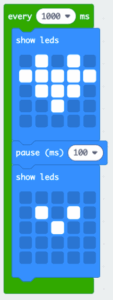
- For each additional LED display the student adds, use a “show leds” and “pause” block.
- Have students plan out their LED design on paper (LED planning sheets) before using their computer. This will help focus them once they are programming.
- If a student wants to forever go between 2 LED displays, this is a great code block to use:
- For each additional LED display the student adds, use a “show leds” and “pause” block.
- Have students plan out their LED design on paper (LED planning sheets) before using their computer. This will help focus them once they are programming.
- If a student wants to forever go between 2 LED displays, this is a great code block to use:
- For each additional LED display the student adds, use a “show leds” and “pause” block.
Assessment Opportunities
If you don’t have actual micro:bits to download the programs to, do a gallery walk instead where students walk around and see what everyone else did on their screen.
If you don’t have actual micro:bits to download the programs to, do a gallery walk instead where students walk around and see what everyone else did on their screen.
If you don’t have actual micro:bits to download the programs to, do a gallery walk instead where students walk around and see what everyone else did on their screen.
Extension Opportunities
- For students that finish early or want an extra challenge, have them tie their display to hitting a button. Or maybe, different buttons display different designs.
- If a student does something different than the majority of the class, have them share out how they programmed it with the class. This will help solidify the student’s understanding and help teach the class new features that they can program.
- For students that finish early or want an extra challenge, have them tie their display to hitting a button. Or maybe, different buttons display different designs.
- If a student does something different than the majority of the class, have them share out how they programmed it with the class. This will help solidify the student’s understanding and help teach the class new features that they can program.
- For students that finish early or want an extra challenge, have them tie their display to hitting a button. Or maybe, different buttons display different designs.
- If a student does something different than the majority of the class, have them share out how they programmed it with the class. This will help solidify the student’s understanding and help teach the class new features that they can program.