Meet Your micro:bit
The BBC micro:bit includes a pre-loaded: “Meet Your micro:bit” program. This pre-loaded program introduces beginners to the BBC micro:bit by exploring its built-in features, such as buttons, LEDs, and sensors.
This activity is intended to be the first “plugged” lesson of the micro:bit and is recommended to follow either “Introducing the BBC micro:bit” or “Hardware, Software and the BBC micro:bit” (both found on Nexus).
Note: Only NEW micro:bits will have the “meet your micro:bit” as a welcome program the first time they are used. If you have previously used a micro:bit, you will need to reload the “meet your micro:bit” program on your micro:bits. If you have previously used a micro:bit, follow this link to learn how to restart them OR upload the meet your micro:bit program to your micro:bits yourself: https://drive.google.com/file/d/1mAuWcdh-FVthRKN9vXf2rmlehOAFauMT/view?usp=drive_link
Materials
-
'Meet your micro:bit' introduction
https://youtu.be/lH1Gu20qpHA -
Meet your micro:bit worksheet
https://drive.google.com/file/d/1gMjw9G6W6du0AYe1shEPGQ6sNqnooeZr/view?usp=drive_link -
“meet your micro:bit” file (to download)
https://drive.google.com/file/d/1dDdSLcpeRYHJc2FE5KRWSvLdynL2_-Fz/view?usp=drive_link
Lesson Plan
- Have students check they have all the necessary supplies:
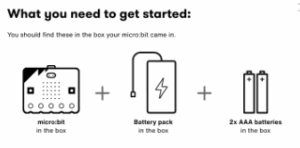
- Pass out the ‘meet the micro:bit’ program worksheet so students can keep track of what happens. The worksheet connects the concepts of student actions (inputs) with what happens (outputs). Meet your micro:bit worksheet
- Have students power up the micro:bits:
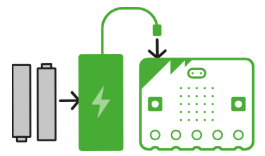
- “Welcome to your micro:bit. All new (never been used before) micro:bits are distributed with a ‘meet the micro:bit’ program to help you explore key features. When it turns on, the LED display output will spring into life and, in most cases, will greet you with a heart.” (No heart? Check these tips to troubleshoot. Note: Only new micro:bits will have this heart as a welcome the first time they are used: https://microbit.org/get-started/user-guide/meet-the-microbit-program/)

- Have students press A, B and A+B; also, try with the device covered/in the dark.
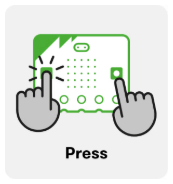
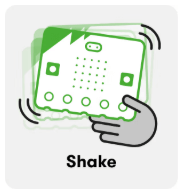
- Have students give the micro:bit a shake; the built-in accelerometer detects movement.
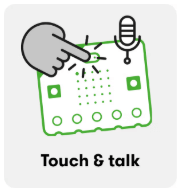
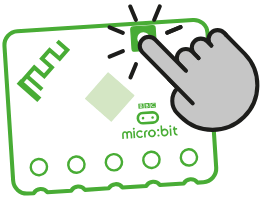
- Have students touch the micro:bit logo; say a few words then release the logo.
- Have students practice turning off a micro:bit: Hold the reset button until the light goes out (about 4 seconds) to power off a micro:bit. Power off at the end of each use to conserve batteries (or unplug the battery pack).
- Be sure to utilize your classroom management disassembly and collection process to return the micro:bits to their classroom storage.
- Have students check they have all the necessary supplies:
- Pass out the ‘meet the micro:bit’ program worksheet so students can keep track of what happens. The worksheet connects the concepts of student actions (inputs) with what happens (outputs). Meet your micro:bit worksheet
- Have students power up the micro:bits:
- “Welcome to your micro:bit. All new (never been used before) micro:bits are distributed with a ‘meet the micro:bit’ program to help you explore key features. When it turns on, the LED display output will spring into life and, in most cases, will greet you with a heart.” (No heart? Check these tips to troubleshoot. Note: Only new micro:bits will have this heart as a welcome the first time they are used: https://microbit.org/get-started/user-guide/meet-the-microbit-program/)
- Have students press A, B and A+B; also, try with the device covered/in the dark.
- Have students give the micro:bit a shake; the built-in accelerometer detects movement.
- Have students touch the micro:bit logo; say a few words then release the logo.
- Have students practice turning off a micro:bit: Hold the reset button until the light goes out (about 4 seconds) to power off a micro:bit. Power off at the end of each use to conserve batteries (or unplug the battery pack).
- Be sure to utilize your classroom management disassembly and collection process to return the micro:bits to their classroom storage.
- Have students check they have all the necessary supplies:
- Pass out the ‘meet the micro:bit’ program worksheet so students can keep track of what happens. The worksheet connects the concepts of student actions (inputs) with what happens (outputs). Meet your micro:bit worksheet
- Have students power up the micro:bits:
- “Welcome to your micro:bit. All new (never been used before) micro:bits are distributed with a ‘meet the micro:bit’ program to help you explore key features. When it turns on, the LED display output will spring into life and, in most cases, will greet you with a heart.” (No heart? Check these tips to troubleshoot. Note: Only new micro:bits will have this heart as a welcome the first time they are used: https://microbit.org/get-started/user-guide/meet-the-microbit-program/)
- Have students press A, B and A+B; also, try with the device covered/in the dark.
- Have students give the micro:bit a shake; the built-in accelerometer detects movement.
- Have students touch the micro:bit logo; say a few words then release the logo.
- Have students practice turning off a micro:bit: Hold the reset button until the light goes out (about 4 seconds) to power off a micro:bit. Power off at the end of each use to conserve batteries (or unplug the battery pack).
- Be sure to utilize your classroom management disassembly and collection process to return the micro:bits to their classroom storage.
Tips for Running Activity
Only new micro:bits will have the “meet your micro:bit” as a welcome program the first time they are used. If you have previously used a micro:bit, follow this link to learn how to restart them OR upload the meet your micro:bit program to your micro:bits yourself: https://makecode.microbit.org/S84587-90164-59658-99365
Only new micro:bits will have the “meet your micro:bit” as a welcome program the first time they are used. If you have previously used a micro:bit, follow this link to learn how to restart them OR upload the meet your micro:bit program to your micro:bits yourself: https://makecode.microbit.org/S84587-90164-59658-99365
Only new micro:bits will have the “meet your micro:bit” as a welcome program the first time they are used. If you have previously used a micro:bit, follow this link to learn how to restart them OR upload the meet your micro:bit program to your micro:bits yourself: https://makecode.microbit.org/S84587-90164-59658-99365
Vocabulary
- Input: Data sent to a computer for processing, such as button presses and sensor reading.
- Output: The information computers give to users, devices, or other computers.
- Input: Data sent to a computer for processing, such as button presses and sensor reading.
- Output: The information computers give to users, devices, or other computers.
- Input: Data sent to a computer for processing, such as button presses and sensor reading.
- Output: The information computers give to users, devices, or other computers.