Make an AI Storytelling Friend with CreateAI + micro:bit
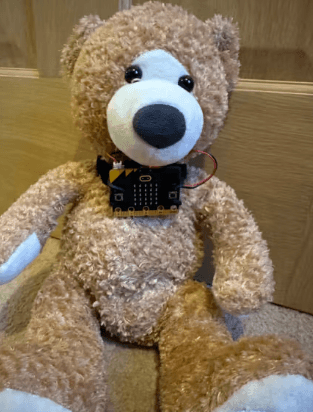
In this project, students use a BBC micro:bit attached to a soft toy to explore how AI machine learning works by training a model to recognize different physical movements. Students begin by selecting specific movements (e.g., shaking, tilting, jumping) that will represent parts of a story they want to retell. Using the micro:bit’s built-in sensors, they collect motion data for each movement and train a machine learning (ML) model to distinguish between them.
Once trained, students test and refine their model, learning that the quality and quantity of data directly impact how accurately the system performs. They then integrate the trained model into a Microsoft MakeCode program, where each recognized movement triggers a corresponding output such as a sound or LED image on the micro:bit. This allows students to bring their story to life through interactive, movement-based inputs.
The intended purpose of this activity is to introduce foundational concepts of artificial intelligence and machine learning—including data collection, training, testing, and iteration.
Materials
-
BBC micro:bit AI Storytelling Friend Project link
https://microbit.org/projects/make-it-code-it/ai-storytelling-friend/ -
micro:bit CreateAI Teaching Tips
https://microbit.org/teach/teaching-tools/#micro:bit-createai -
micro:bit CreateAI website
https://createai.microbit.org/ -
Example CreateAI Code
https://createai.microbit.org/import?id=ai-storytelling-friend&project=Project%3A%20AI%20storytelling%20friend&name=AI%20storytelling%20friend&editors=makecode&_gl=1*19yyyzd*mb_ga*MTMyNjgwNjQ5Ny4xNzczMzMxNzM3*mb_ga_FE3HZ3W83X*czE3NzY3MDQ3ODIkbzExJGcxJHQxNzc2NzA1MjQ3JGo1NiRsMCRoMA
About
- Introduce the Activity
- Have you ever wondered how AI knows what you’re doing—like how your phone counts your steps?
- Could we teach a computer to recognize actions like jumping or sleeping?
- Today, you’re going to train your own AI to tell a story!
- Introduce AI & Machine Learning
- AI (Artificial Intelligence) – AI is a branch of computer science that studies techniques for getting computers to produce intelligent behavior.
- Vocabulary:
- Definition of AI – A body of techniques that allow computers to do things that, when humans do them, are considered evidence of intelligence, including natural language processing, recognizing images, and generating content. AI systems use training data and, based on defined or learned patterns, produce outputs like predictions, recommendations, or decisions.
- AI technologies power the hardware and software behind ChatGPT, intelligent assistants such as Siri and Alexa, online services such as Google and Tiktok, and even autonomous robots.
- Machine Learning – A subfield of artificial intelligence focusing on combining learning algorithms with training data to create models that can be used to complete tasks. Three important types of machine learning are supervised learning, unsupervised learning, and reinforcement learning. Modern AI applications, such as speech recognition systems, are often constructed using machine learning techniques applied to huge training sets.
- Machine Learning (ML) – Machine learning is when computers learn from data instead of being told exactly what to do.
- Explain:
- Humans collect data
- The computer learns patterns
- The system makes predictions
- Through training and programming your micro:bit will learn to recognize movements and respond to them.
- Plan Your Story
- Every good story has actions. Let’s pick 2–3 movements.
- Examples:
- Jumping
- Rolling
- Sleeping
- Brainstorm – How will each movement connect to your story?
- Collect Data
- Now we train the AI by showing it examples.
- Guide students:
- Open CreateAI project
- Connect micro:bit
- Attach micro:bit to toy
- Record multiple samples for each movement
- HINT – The better your data, the smarter your AI model.
- Train & Test the Mode
- Now we give the computer a change to learn.
- Guide students:
- Click Train model
- Test each movement
- Reflect
- Does it recognize your actions correctly?
- If not, we improve it—AI gets better with more data.
- Improve the Model
- Real AI systems are never perfect the first time.
- Guide students:
- Add more samples
- Remove bad data
- Retrain
- Emphasize iteration and refinement
- Put the model and code on your micro:bit
- Now we connect your AI model to code.
- In micro:bit CreateAI, click on ‘Edit in MakeCode’ to see the project code in the MakeCode editor.
- In MakeCode:
- Use ‘on ML action start’ blocks
- Add:
- Show icon
- Play sound
- Your AI model now controls what happens in your story.
- Bring the story to life by testing your the Storytelling friend
- Have students:
- Move the toy
- Watch outputs (sound + LEDs)
- Introduce the Activity
- Have you ever wondered how AI knows what you’re doing—like how your phone counts your steps?
- Could we teach a computer to recognize actions like jumping or sleeping?
- Today, you’re going to train your own AI to tell a story!
- Introduce AI & Machine Learning
- AI (Artificial Intelligence) – AI is a branch of computer science that studies techniques for getting computers to produce intelligent behavior.
- Vocabulary:
- Definition of AI – A body of techniques that allow computers to do things that, when humans do them, are considered evidence of intelligence, including natural language processing, recognizing images, and generating content. AI systems use training data and, based on defined or learned patterns, produce outputs like predictions, recommendations, or decisions.
- AI technologies power the hardware and software behind ChatGPT, intelligent assistants such as Siri and Alexa, online services such as Google and Tiktok, and even autonomous robots.
- Machine Learning – A subfield of artificial intelligence focusing on combining learning algorithms with training data to create models that can be used to complete tasks. Three important types of machine learning are supervised learning, unsupervised learning, and reinforcement learning. Modern AI applications, such as speech recognition systems, are often constructed using machine learning techniques applied to huge training sets.
- Vocabulary:
- Machine Learning (ML) – Machine learning is when computers learn from data instead of being told exactly what to do.
- Explain:
- Humans collect data
- The computer learns patterns
- The system makes predictions
- Explain:
- Through training and programming your micro:bit will learn to recognize movements and respond to them.
- AI (Artificial Intelligence) – AI is a branch of computer science that studies techniques for getting computers to produce intelligent behavior.
- Plan Your Story
- Every good story has actions. Let’s pick 2–3 movements.
- Examples:
- Jumping
- Rolling
- Sleeping
- Examples:
- Brainstorm – How will each movement connect to your story?
- Every good story has actions. Let’s pick 2–3 movements.
- Collect Data
- Now we train the AI by showing it examples.
- Guide students:
- Open CreateAI project
- Connect micro:bit
- Attach micro:bit to toy
- Record multiple samples for each movement
- HINT – The better your data, the smarter your AI model.
- Train & Test the Mode
- Now we give the computer a change to learn.
- Guide students:
- Click Train model
- Test each movement
- Reflect
- Does it recognize your actions correctly?
- If not, we improve it—AI gets better with more data.
- Improve the Model
- Real AI systems are never perfect the first time.
- Guide students:
- Add more samples
- Remove bad data
- Retrain
- Emphasize iteration and refinement
- Put the model and code on your micro:bit
- Now we connect your AI model to code.
- In micro:bit CreateAI, click on ‘Edit in MakeCode’ to see the project code in the MakeCode editor.
- In MakeCode:
- Use ‘on ML action start’ blocks
- Add:
- Show icon
- Play sound
- Your AI model now controls what happens in your story.
- Bring the story to life by testing your the Storytelling friend
- Have students:
- Move the toy
- Watch outputs (sound + LEDs)
- Have students:
- Introduce the Activity
- Have you ever wondered how AI knows what you’re doing—like how your phone counts your steps?
- Could we teach a computer to recognize actions like jumping or sleeping?
- Today, you’re going to train your own AI to tell a story!
- Introduce AI & Machine Learning
- AI (Artificial Intelligence) – AI is a branch of computer science that studies techniques for getting computers to produce intelligent behavior.
- Vocabulary:
- Definition of AI – A body of techniques that allow computers to do things that, when humans do them, are considered evidence of intelligence, including natural language processing, recognizing images, and generating content. AI systems use training data and, based on defined or learned patterns, produce outputs like predictions, recommendations, or decisions.
- AI technologies power the hardware and software behind ChatGPT, intelligent assistants such as Siri and Alexa, online services such as Google and Tiktok, and even autonomous robots.
- Machine Learning – A subfield of artificial intelligence focusing on combining learning algorithms with training data to create models that can be used to complete tasks. Three important types of machine learning are supervised learning, unsupervised learning, and reinforcement learning. Modern AI applications, such as speech recognition systems, are often constructed using machine learning techniques applied to huge training sets.
- Vocabulary:
- Machine Learning (ML) – Machine learning is when computers learn from data instead of being told exactly what to do.
- Explain:
- Humans collect data
- The computer learns patterns
- The system makes predictions
- Explain:
- Through training and programming your micro:bit will learn to recognize movements and respond to them.
- AI (Artificial Intelligence) – AI is a branch of computer science that studies techniques for getting computers to produce intelligent behavior.
- Plan Your Story
- Every good story has actions. Let’s pick 2–3 movements.
- Examples:
- Jumping
- Rolling
- Sleeping
- Examples:
- Brainstorm – How will each movement connect to your story?
- Every good story has actions. Let’s pick 2–3 movements.
- Collect Data
- Now we train the AI by showing it examples.
- Guide students:
- Open CreateAI project
- Connect micro:bit
- Attach micro:bit to toy
- Record multiple samples for each movement
- HINT – The better your data, the smarter your AI model.
- Train & Test the Mode
- Now we give the computer a change to learn.
- Guide students:
- Click Train model
- Test each movement
- Reflect
- Does it recognize your actions correctly?
- If not, we improve it—AI gets better with more data.
- Improve the Model
- Real AI systems are never perfect the first time.
- Guide students:
- Add more samples
- Remove bad data
- Retrain
- Emphasize iteration and refinement
- Put the model and code on your micro:bit
- Now we connect your AI model to code.
- In micro:bit CreateAI, click on ‘Edit in MakeCode’ to see the project code in the MakeCode editor.
- In MakeCode:
- Use ‘on ML action start’ blocks
- Add:
- Show icon
- Play sound
- Your AI model now controls what happens in your story.
- Bring the story to life by testing your the Storytelling friend
- Have students:
- Move the toy
- Watch outputs (sound + LEDs)
- Have students:
Tips for Running Activity
This is a big conceptual leap—go slow with AI explanations
- Focus on:
- Humans train AI
- Data quality matters
- AI is not “magic”—it’s pattern recognition
- Expect variability—models won’t all work perfectly
This is a big conceptual leap—go slow with AI explanations
- Focus on:
- Humans train AI
- Data quality matters
- AI is not “magic”—it’s pattern recognition
- Expect variability—models won’t all work perfectly
This is a big conceptual leap—go slow with AI explanations
- Focus on:
- Humans train AI
- Data quality matters
- AI is not “magic”—it’s pattern recognition
- Expect variability—models won’t all work perfectly
Assessment Opportunities
- Exit ticket:
- What is machine learning?
- How did your model improve?
- What role did data play?
- What would you change next time?
- Reflection questions
- How did your AI learn?
- What made your model better?
- What mistakes did it make?
- How is this different from other coding programs you have done in the past?
- Exit ticket:
- What is machine learning?
- How did your model improve?
- What role did data play?
- What would you change next time?
- Reflection questions
- How did your AI learn?
- What made your model better?
- What mistakes did it make?
- How is this different from other coding programs you have done in the past?
- Exit ticket:
- What is machine learning?
- How did your model improve?
- What role did data play?
- What would you change next time?
- Reflection questions
- How did your AI learn?
- What made your model better?
- What mistakes did it make?
- How is this different from other coding programs you have done in the past?
Extension Opportunities
Students can:
- Add more movements (e.g., dancing, falling)
- Customize LED animations
- Retell a fairy tale or personal story
- Compare AI vs non-AI projects
Students can:
- Add more movements (e.g., dancing, falling)
- Customize LED animations
- Retell a fairy tale or personal story
- Compare AI vs non-AI projects
Students can:
- Add more movements (e.g., dancing, falling)
- Customize LED animations
- Retell a fairy tale or personal story
- Compare AI vs non-AI projects