Introduction to MakeCode
Introduction to Make Code is an activity that allows students the opportunity to explore the MakeCode platform. Microsoft MakeCode is an environment that students will use to create programs that the micro:bit can understand in any of three different computer languages, Blocks, JavaScript and Python.
This activity is intended to be the first look at the MakeCode platform. The teacher will begin with a tour of the features of the platform and then allow the students independent exploration as they complete the Scavenger Hunt.
Students will search for and identify blocks from categories like “Basic,” “Input,” and “Loops,” learning how to navigate the toolbox and understand the purpose of each section. This interactive activity builds familiarity with the coding environment while sparking curiosity about how the blocks can be used in programming.
Lesson Plan
- Introduce the Make Code platform to students by displaying the MakeCode website in front of all students, https://makecode.microbit.org/. Share with students that Microsoft MakeCode is an environment that students will use to create programs that the micro:bit can understand in any of three different computer languages, Blocks, JavaScript and Python.
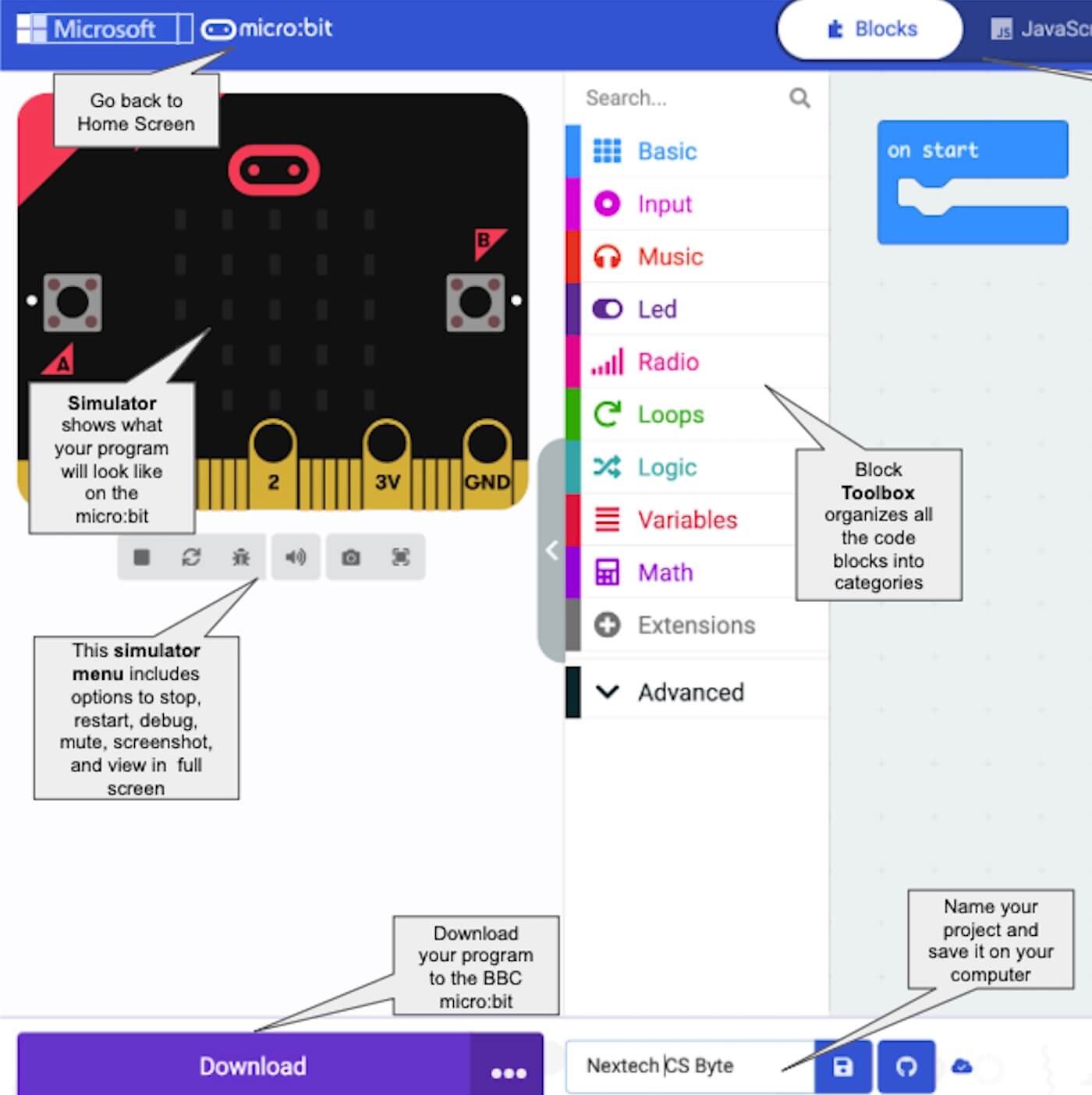
- Give students a tour of the Platform: Begin with a tour of the features of the platform. Either display the website on a main screen or use this slide to go over the names of the different sections within the MakeCode environment – MakeCode Platform
- Allow the students independent exploration as they complete the Scavenger Hunt – https://docs.google.com/forms/d/1fDjcXK8JQFXznB6SfTwaSE6jLXZVwvc5zg71qLfY75A/copy
- Introduce the Make Code platform to students by displaying the MakeCode website in front of all students, https://makecode.microbit.org/. Share with students that Microsoft MakeCode is an environment that students will use to create programs that the micro:bit can understand in any of three different computer languages, Blocks, JavaScript and Python.
- Give students a tour of the Platform: Begin with a tour of the features of the platform. Either display the website on a main screen or use this slide to go over the names of the different sections within the MakeCode environment – MakeCode Platform
- Allow the students independent exploration as they complete the Scavenger Hunt – https://docs.google.com/forms/d/1fDjcXK8JQFXznB6SfTwaSE6jLXZVwvc5zg71qLfY75A/copy
- Introduce the Make Code platform to students by displaying the MakeCode website in front of all students, https://makecode.microbit.org/. Share with students that Microsoft MakeCode is an environment that students will use to create programs that the micro:bit can understand in any of three different computer languages, Blocks, JavaScript and Python.
- Give students a tour of the Platform: Begin with a tour of the features of the platform. Either display the website on a main screen or use this slide to go over the names of the different sections within the MakeCode environment – MakeCode Platform
- Allow the students independent exploration as they complete the Scavenger Hunt – https://docs.google.com/forms/d/1fDjcXK8JQFXznB6SfTwaSE6jLXZVwvc5zg71qLfY75A/copy
Tip for Running Activity
Students can’t break the platform. Encourage them to practice dragging out blocks and sapping them together. Once they have blocks out in the workspace encourage them to figure out how to get rid of them.
Students can’t break the platform. Encourage them to practice dragging out blocks and sapping them together. Once they have blocks out in the workspace encourage them to figure out how to get rid of them.
Students can’t break the platform. Encourage them to practice dragging out blocks and sapping them together. Once they have blocks out in the workspace encourage them to figure out how to get rid of them.
Extension Opportunities
- Practice challenges to encourage students to play with the platform:
- Can you figure out how to duplicate a code?
- Can you add a comment to a code?
- Practice challenges to encourage students to play with the platform:
- Can you figure out how to duplicate a code?
- Can you add a comment to a code?
- Practice challenges to encourage students to play with the platform:
- Can you figure out how to duplicate a code?
- Can you add a comment to a code?