Introducing the BBC micro:bit
In this activity we are going to explore the hardware of a micro:bit. Students will be introduced to physical hardware of the micro:bit and sensors, identifying opportunities for input and outputs.
This activity is intended to be used to introduce students to the physical hardware of a micro:bit. This should be the first time the students are using the micro:bit in your classroom. For maximum success with this lesson the micro:bit should not be plugged into a power source (no batteries / computer). Additional time should be allotted to establish the classroom management processes for distribution, collection, assembly, and proper use in your classroom.
Materials
-
Introducing the BBC micro:bit - BBC Make It Digital
https://youtu.be/Wuza5WXiMkc -
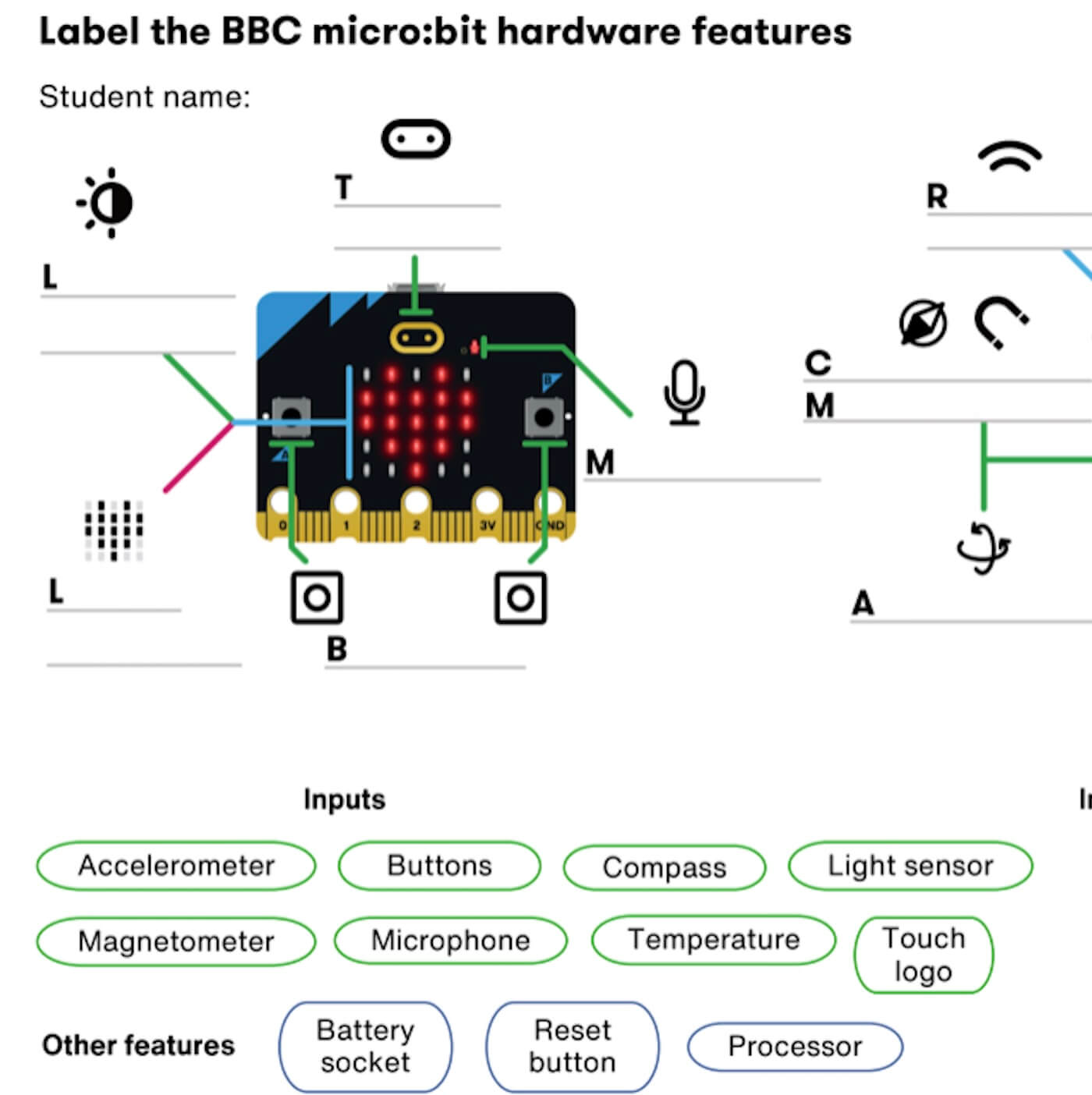
Labeling Worksheet - micro:bit
https://drive.google.com/file/d/1tYlUqua6YElDJRGqitMB6w8sF0ksnko_/view?usp=drive_link
Main Lesson Plan
- Introduce the micro:bit to your students by showing this video: Introducing the BBC micro:bit – BBC Make It Digital
- Start this activity by having students explore the physical device of a micro:bit – this means do not plug the micro:bit into the computer or battery pack.
- Students should explore the micro:bit using a magnifying lens and looking for markings on the front and back. Have students share what they notice during this time.
- Display the annotated poster individually, or for the whole class, and discuss as a class the features of the micro:bit.
- After students have explored the micro:bit for a few moments, review the vocabulary terms input and output. Before watching the next BBC video, ask your students if they can identify any inputs and outputs on their own.
- Watch the following input and output video as a class: Input and output devices
- Allow students time to finish identifying any missed inputs or outputs.
- If time permits, check for student understanding by having students label the parts of the BBC micro:bit in either the paper microbit labelling worksheet.pdf or digital Label V2 Microbit (Label V2 Microbit, micro:bit labeling worksheet)
- Conclude by demonstrating your local class collection process for the micro:bits.
- Introduce the micro:bit to your students by showing this video: Introducing the BBC micro:bit – BBC Make It Digital
- Start this activity by having students explore the physical device of a micro:bit – this means do not plug the micro:bit into the computer or battery pack.
- Students should explore the micro:bit using a magnifying lens and looking for markings on the front and back. Have students share what they notice during this time.
- Display the annotated poster individually, or for the whole class, and discuss as a class the features of the micro:bit.
- After students have explored the micro:bit for a few moments, review the vocabulary terms input and output. Before watching the next BBC video, ask your students if they can identify any inputs and outputs on their own.
- Watch the following input and output video as a class: Input and output devices
- Allow students time to finish identifying any missed inputs or outputs.
- If time permits, check for student understanding by having students label the parts of the BBC micro:bit in either the paper microbit labelling worksheet.pdf or digital Label V2 Microbit (Label V2 Microbit, micro:bit labeling worksheet)
- Conclude by demonstrating your local class collection process for the micro:bits.
- Introduce the micro:bit to your students by showing this video: Introducing the BBC micro:bit – BBC Make It Digital
- Start this activity by having students explore the physical device of a micro:bit – this means do not plug the micro:bit into the computer or battery pack.
- Students should explore the micro:bit using a magnifying lens and looking for markings on the front and back. Have students share what they notice during this time.
- Display the annotated poster individually, or for the whole class, and discuss as a class the features of the micro:bit.
- After students have explored the micro:bit for a few moments, review the vocabulary terms input and output. Before watching the next BBC video, ask your students if they can identify any inputs and outputs on their own.
- Watch the following input and output video as a class: Input and output devices
- Allow students time to finish identifying any missed inputs or outputs.
- If time permits, check for student understanding by having students label the parts of the BBC micro:bit in either the paper microbit labelling worksheet.pdf or digital Label V2 Microbit (Label V2 Microbit, micro:bit labeling worksheet)
- Conclude by demonstrating your local class collection process for the micro:bits.
Tips for Running Activity
- Investing time into having students learn the sensor and features that make the micro:bit remarkable enables students to have a greater understanding of what the micro:bit is capable of and increases their creative potential when designing their own projects.
Need guidance on micro:bit, we’ve created this FAQ.
- Investing time into having students learn the sensor and features that make the micro:bit remarkable enables students to have a greater understanding of what the micro:bit is capable of and increases their creative potential when designing their own projects.
Need guidance on micro:bit, we’ve created this FAQ.
- Investing time into having students learn the sensor and features that make the micro:bit remarkable enables students to have a greater understanding of what the micro:bit is capable of and increases their creative potential when designing their own projects.
Need guidance on micro:bit, we’ve created this FAQ.
Assessment Opportunities
- Use either of the labeling the micro:bit assignments as a check for understanding:
-
- Exit ticket: Ask students to identify the sensor they are most excited to use and why.
- Use either of the labeling the micro:bit assignments as a check for understanding:
- Exit ticket: Ask students to identify the sensor they are most excited to use and why.
- Use either of the labeling the micro:bit assignments as a check for understanding:
- Exit ticket: Ask students to identify the sensor they are most excited to use and why.
Vocabulary
- Input: Data sent to a computer for processing, such as button presses & sensor reading.
- Output: the information computers give to users, devices, or other computers.
- Sensor: An input that senses things in the real world, such as movement, temperature, and light levels.
- Input: Data sent to a computer for processing, such as button presses & sensor reading.
- Output: the information computers give to users, devices, or other computers.
- Sensor: An input that senses things in the real world, such as movement, temperature, and light levels.
- Input: Data sent to a computer for processing, such as button presses & sensor reading.
- Output: the information computers give to users, devices, or other computers.
- Sensor: An input that senses things in the real world, such as movement, temperature, and light levels.