Decoding Binary Valentines
Converting Valentine’s messages into binary code transforms a familiar holiday activity into an engaging introduction to how computers communicate.
Begin with a whole-class demonstration using a simple message and a clear binary conversion chart, taking time to show how each letter transforms into its binary representation. Then transition students into paired work where they first collaborate to decode pre-made examples before creating their own messages, ensuring each pair has access to reference materials and encouraging them to check each other’s work for accuracy before final exchanges.
Main Lesson Plan
K-2 Supplies:
3-12 Supplies:
Lesson:
- Introduce that students will be decoding messages (either using the Shaded Squares Key or the 0s and 1s Binary Key):
- Class slides demonstrating decoding a message (both shaded squares and 0s/1s)
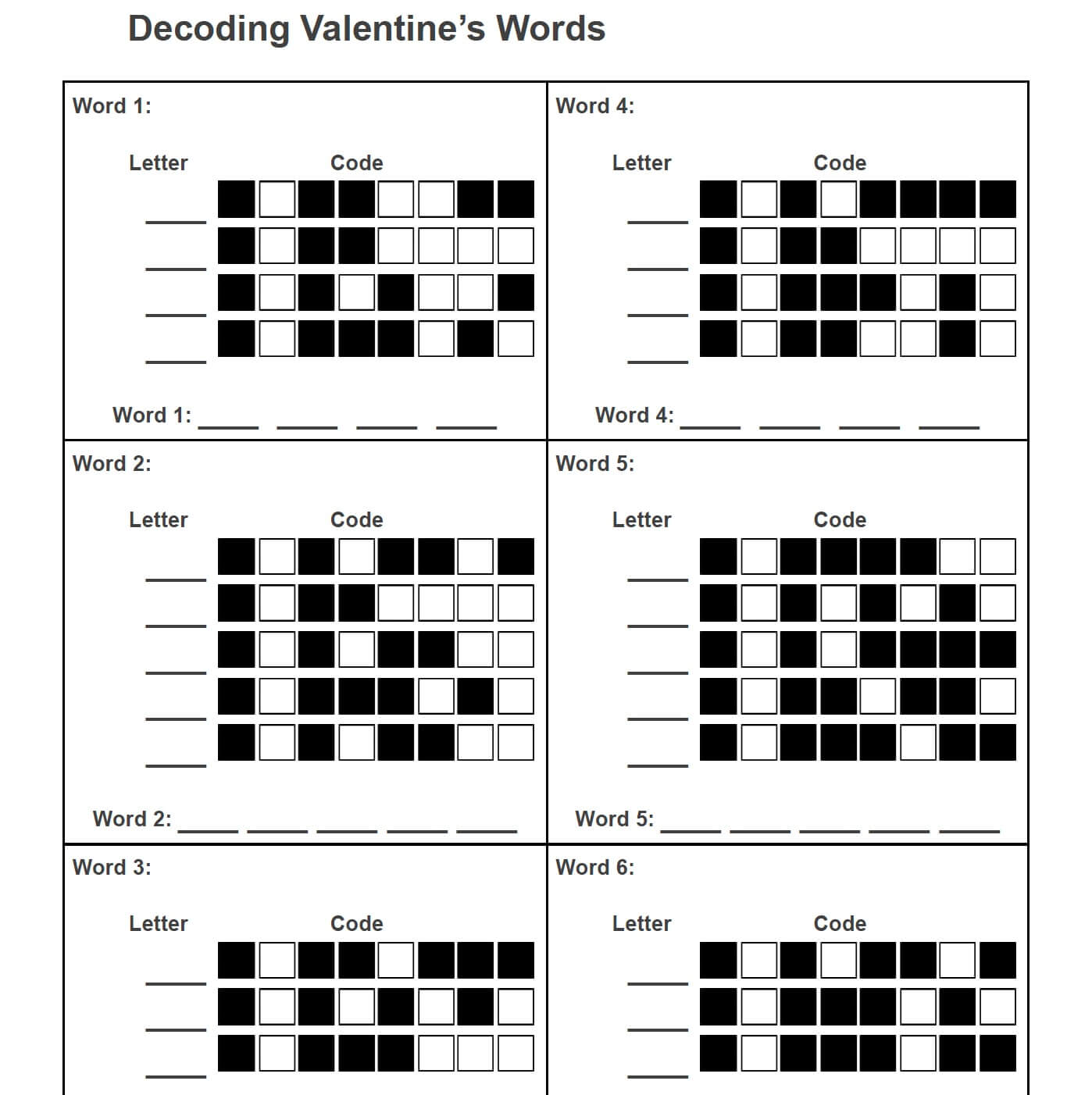
- Valentine Words to Decode (shaded squares)
- Valentine Words to Decode (0s and 1s)
- With their knowledge of how the coded messages work, students will now create their own encoded Valentine’s Cards
- Binary Code Valentine’s Cards (shaded squares)
- Binary Code Valentine’s Cards (0s and 1s)
K-2 Supplies:
3-12 Supplies:
Lesson:
- Introduce that students will be decoding messages (either using the Shaded Squares Key or the 0s and 1s Binary Key):
- Class slides demonstrating decoding a message (both shaded squares and 0s/1s)
- Valentine Words to Decode (shaded squares)
- Valentine Words to Decode (0s and 1s)
- With their knowledge of how the coded messages work, students will now create their own encoded Valentine’s Cards
- Binary Code Valentine’s Cards (shaded squares)
- Binary Code Valentine’s Cards (0s and 1s)
K-2 Supplies:
3-12 Supplies:
Lesson:
- Introduce that students will be decoding messages (either using the Shaded Squares Key or the 0s and 1s Binary Key):
- Class slides demonstrating decoding a message (both shaded squares and 0s/1s)
- Valentine Words to Decode (shaded squares)
- Valentine Words to Decode (0s and 1s)
- With their knowledge of how the coded messages work, students will now create their own encoded Valentine’s Cards
- Binary Code Valentine’s Cards (shaded squares)
- Binary Code Valentine’s Cards (0s and 1s)
Tips for Running Activity
- For younger students, use the shaded squares as the code (not the 0s and 1s). This will help them with recognizing patterns.
- There are 3 activities in one, use what makes the most sense for your student knowledge and abilities as well as the amount of time you have to spend on this in your classroom:
- Learn to decode words/messages (first as a class, then as pairs or individually)
- Learn to encode your own word/message
- Decode your partner/classmate’s word/message
- Come up with your own 0s and 1s words and phrases using this website: https://www.rapidtables.com/convert/number/ascii-to-binary.html
- NOTE: Spaces are 00100000, so if you don’t want to include spaces, make sure your text doesn’t have them in it before you click “=Convert”
- For younger students, use the shaded squares as the code (not the 0s and 1s). This will help them with recognizing patterns.
- There are 3 activities in one, use what makes the most sense for your student knowledge and abilities as well as the amount of time you have to spend on this in your classroom:
- Learn to decode words/messages (first as a class, then as pairs or individually)
- Learn to encode your own word/message
- Decode your partner/classmate’s word/message
- Come up with your own 0s and 1s words and phrases using this website: https://www.rapidtables.com/convert/number/ascii-to-binary.html
- NOTE: Spaces are 00100000, so if you don’t want to include spaces, make sure your text doesn’t have them in it before you click “=Convert”
- For younger students, use the shaded squares as the code (not the 0s and 1s). This will help them with recognizing patterns.
- There are 3 activities in one, use what makes the most sense for your student knowledge and abilities as well as the amount of time you have to spend on this in your classroom:
- Learn to decode words/messages (first as a class, then as pairs or individually)
- Learn to encode your own word/message
- Decode your partner/classmate’s word/message
- Come up with your own 0s and 1s words and phrases using this website: https://www.rapidtables.com/convert/number/ascii-to-binary.html
- NOTE: Spaces are 00100000, so if you don’t want to include spaces, make sure your text doesn’t have them in it before you click “=Convert”
Answer Keys / Exemplars
- Slide Message: SECRET CODE
- Valentine Words to Decode (shaded squares) Solution: (1) LOVE, (2) ROSES, (3) HUG, (4) POEM, (5) CUPID, (6) RED
- Valentine Words to Decode (0s and 1s) Solution: (1) CUPID, (2) Heart, (3) BeMine, (4) LOVE!
- Slide Message: SECRET CODE
- Valentine Words to Decode (shaded squares) Solution: (1) LOVE, (2) ROSES, (3) HUG, (4) POEM, (5) CUPID, (6) RED
- Valentine Words to Decode (0s and 1s) Solution: (1) CUPID, (2) Heart, (3) BeMine, (4) LOVE!
- Slide Message: SECRET CODE
- Valentine Words to Decode (shaded squares) Solution: (1) LOVE, (2) ROSES, (3) HUG, (4) POEM, (5) CUPID, (6) RED
- Valentine Words to Decode (0s and 1s) Solution: (1) CUPID, (2) Heart, (3) BeMine, (4) LOVE!
Assessment Opportunities
- Walk around and check students’ results
- Have students confirm what they decoded with a partner, elbow partner, or tablemate. If partners don’t agree on the result, have them debug their decoding.
- When you have students encode words / messages and then decode partner words / messages, they are demonstrating understanding of this activity.
- Walk around and check students’ results
- Have students confirm what they decoded with a partner, elbow partner, or tablemate. If partners don’t agree on the result, have them debug their decoding.
- When you have students encode words / messages and then decode partner words / messages, they are demonstrating understanding of this activity.
- Walk around and check students’ results
- Have students confirm what they decoded with a partner, elbow partner, or tablemate. If partners don’t agree on the result, have them debug their decoding.
- When you have students encode words / messages and then decode partner words / messages, they are demonstrating understanding of this activity.