AI Sports Data Logger with micro:bit + CreateAI
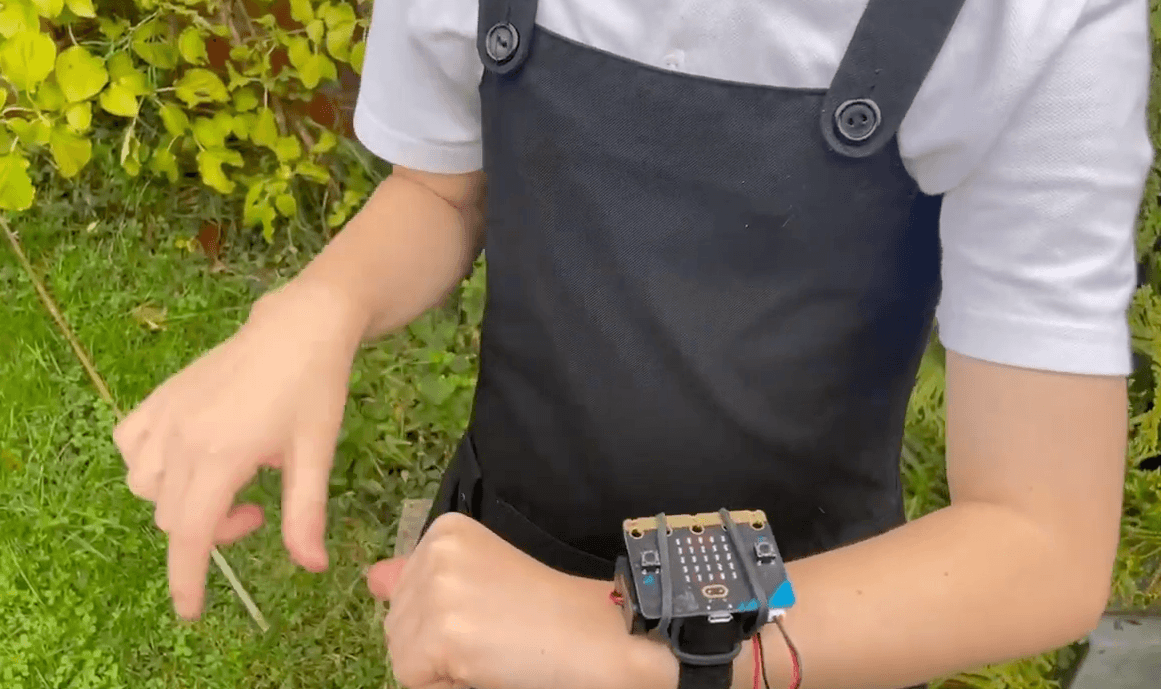
In this advanced physical computing and artificial intelligence activity, students build an “AI Sports Data Logger” using the micro:bit CreateAI platform and Microsoft MakeCode In this activity students train a machine learning model using CreateAI to recognize different body movements such as running, walking, and remaining still by collecting accelerometer data directly from the BBC micro:bit. After gathering movement samples, students train and test their AI model, improve its accuracy with additional data, and deploy the trained model back onto the micro:bit.
Materials
-
BBC micro:bit AI sports data logger Project link
https://microbit.org/projects/make-it-code-it/ai-sports-data-logger/ -
AI sports data logger video
https://youtu.be/EgHBhPFOwBY?si=Scyf_SGJWfPopzsk -
CreateAI Example Code
https://createai.microbit.org/import?id=ai-sports-data-logger&project=Project%3A%20AI%20sports%20data%20logger&name=AI%20sports%20data%20logger&editors=makecode&_gl=1*feuzbi*mb_ga*MTMyNjgwNjQ5Ny4xNzczMzMxNzM3*mb_ga_FE3HZ3W83X*czE3Nzc5MTI2MTAkbzE5JGcxJHQxNzc3OTE0MDA4JGo2MCRsMCRoMA
About
- Introduce the Activity
- Discussion Questions
- How do fitness trackers know when you are walking or running?
- What kinds of data can wearable devices collect?
- Can AI recognize human movement patterns?
- What role do humans play in training AI systems?
- Optionally, introduce:
- Accelerometers
- Data Logging
- Introduce AI & Machine Learning
- Machine learning means teaching a computer using examples instead of step-by-step instructions.
- Explain simply:
- You give examples (dataset)
- The computer finds patterns in the data
- It predicts what new inputs are
- We’re going to teach it to recognize movements
- Collect Training Data
- Guide students in CreateAI:
- Create movement classes:
- Walking
- Running
- Still (at rest)
- Connect your micro:bit to CreateAI
- Record multiple samples for each class
- The more good examples you give, the better your AI will work.
- Train & Test the Model
- Train model once you have recorded enough data, and see what your AI learned.
- Students:
- Click Train model
- Test movements
- Discuss:
- Does it recognize correctly?
- Where does it make mistakes?
- Improve the Model (Iteration)
- AI gets better with better data. Are there any classes that need more data to help improve the accuracy of detecting the movements correctly?
- Students:
- Add more sample data to the classes
- Remove incorrect ones
- Retrain and test
- Connect AI to micro:bit Code & Log Data
- Export the model to MakeCode.
- Download the program onto the micro:bit.
- Start and stop activity logging.
- Wear the device during movement activities.
- Analyze the Data
- Open the MY_DATA file from the micro:bit.
- View graphs and tables of movement data.
- Introduce the Activity
- Discussion Questions
- How do fitness trackers know when you are walking or running?
- What kinds of data can wearable devices collect?
- Can AI recognize human movement patterns?
- What role do humans play in training AI systems?
- Optionally, introduce:
- Accelerometers
- Data Logging
- Discussion Questions
- Introduce AI & Machine Learning
- Machine learning means teaching a computer using examples instead of step-by-step instructions.
- Explain simply:
- You give examples (dataset)
- The computer finds patterns in the data
- It predicts what new inputs are
- We’re going to teach it to recognize movements
- Collect Training Data
- Guide students in CreateAI:
- Create movement classes:
- Walking
- Running
- Still (at rest)
- Connect your micro:bit to CreateAI
- Record multiple samples for each class
- The more good examples you give, the better your AI will work.
- Train & Test the Model
- Train model once you have recorded enough data, and see what your AI learned.
- Students:
- Click Train model
- Test movements
- Discuss:
- Does it recognize correctly?
- Where does it make mistakes?
- Improve the Model (Iteration)
- AI gets better with better data. Are there any classes that need more data to help improve the accuracy of detecting the movements correctly?
- Students:
- Add more sample data to the classes
- Remove incorrect ones
- Retrain and test
- Connect AI to micro:bit Code & Log Data
- Export the model to MakeCode.
- Download the program onto the micro:bit.
- Start and stop activity logging.
- Wear the device during movement activities.
- Analyze the Data
- Open the MY_DATA file from the micro:bit.
- View graphs and tables of movement data.
- Introduce the Activity
- Discussion Questions
- How do fitness trackers know when you are walking or running?
- What kinds of data can wearable devices collect?
- Can AI recognize human movement patterns?
- What role do humans play in training AI systems?
- Optionally, introduce:
- Accelerometers
- Data Logging
- Discussion Questions
- Introduce AI & Machine Learning
- Machine learning means teaching a computer using examples instead of step-by-step instructions.
- Explain simply:
- You give examples (dataset)
- The computer finds patterns in the data
- It predicts what new inputs are
- We’re going to teach it to recognize movements
- Collect Training Data
- Guide students in CreateAI:
- Create movement classes:
- Walking
- Running
- Still (at rest)
- Connect your micro:bit to CreateAI
- Record multiple samples for each class
- The more good examples you give, the better your AI will work.
- Train & Test the Model
- Train model once you have recorded enough data, and see what your AI learned.
- Students:
- Click Train model
- Test movements
- Discuss:
- Does it recognize correctly?
- Where does it make mistakes?
- Improve the Model (Iteration)
- AI gets better with better data. Are there any classes that need more data to help improve the accuracy of detecting the movements correctly?
- Students:
- Add more sample data to the classes
- Remove incorrect ones
- Retrain and test
- Connect AI to micro:bit Code & Log Data
- Export the model to MakeCode.
- Download the program onto the micro:bit.
- Start and stop activity logging.
- Wear the device during movement activities.
- Analyze the Data
- Open the MY_DATA file from the micro:bit.
- View graphs and tables of movement data.
Tips for Running Activity
- Encourage consistent placement of the micro:bit when collecting data (holding, pocket, secured to body).
- Collect varied “still” positions to improve accuracy.
- Have students compare data between different people.
- Encourage consistent placement of the micro:bit when collecting data (holding, pocket, secured to body).
- Collect varied “still” positions to improve accuracy.
- Have students compare data between different people.
- Encourage consistent placement of the micro:bit when collecting data (holding, pocket, secured to body).
- Collect varied “still” positions to improve accuracy.
- Have students compare data between different people.