micro:bit CreateAI
This activity introduces the new AI tool from micro:bit called micro:bit CreateAI, and introduces educators to how this tool works in general and highlights three BBC micro:bit lesson plans to use this tool.
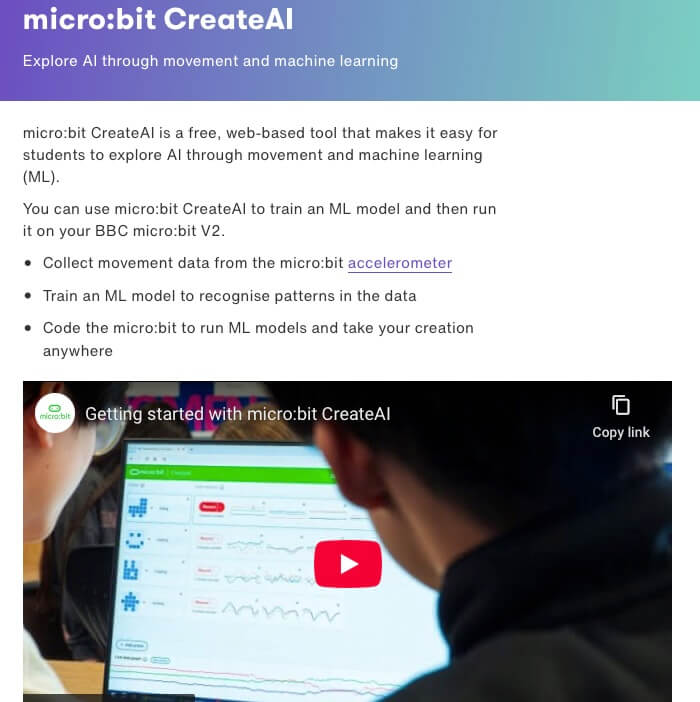
The micro:bit CreateAI is a free, web-based tool that makes it easy for students to explore AI through movement and machine learning, and take it into the real world with a BBC micro:bit. This tools allows students to add AI to your micro:bit learning experience. Students collect their own data to train, test and improve machine learning (ML) models to recognise and respond to different movements. They can then create programs using these models in MakeCode, and use them on micro:bits anywhere.
Materials
-
Getting started with micro:bit CreateAI
https://www.youtube.com/watch?v=yWl3WxDE6QI -
Discover micro:bit CreateAI
https://www.youtube.com/watch?v=kqNy5N3WLtM -
User guide to the micro:bit CreateAI
https://microbit.org/get-started/user-guide/microbit-createai/ -
micro:bit CreateAI Glossary
https://microbit.org/teach/classroom-resources/microbit-createai-glossary/
Lesson Plan Information
Use one of the following micro:bits CreateAI lessons to bring micro:bit Create AI to your classroom.
- Simple AI Exercise Timer – A great first project to build with micro:bit CreateAI. Make a smart exercise timer that can tell how long you’re active or inactive. In this project you’ll train a machine learning (ML) model to recognise when you’re exercising and when you’re not exercising. You’ll combine that model with a MakeCode program to make an exercise timer and put this project on your BBC micro:bit. Simply wear the micro:bit to time how long you’ve been exercising or not exercising. Press button A to see how many seconds you’ve been active, and B to see how long you’ve been inactive.
- AI Activity Timer – An easy project to personalise using micro:bit CreateAI. Make a smart timer that can detect how long you have been doing different activities. In this project you’ll train a machine learning (ML) model to recognise when you’re doing specific movements while wearing a BBC micro:bit. You’ll combine that model with a MakeCode program to make an activity timer and put both the model and the code on your micro:bit. Simply wear the micro:bit to time how long you’ve been doing different activities. Press buttons A or B to see how many seconds you’ve been doing each activity.
- AI Storytelling Friend – A great way to use what children already know about narrative and character development to support new learning about AI. In this project you’ll train a machine learning (ML) model to recognise different ways that you move a soft toy with a BBC micro:bit attached to it. You’ll choose movements to help you retell a story. You will then combine the machine learning model with a Microsoft MakeCode program, and the micro:bit will play sounds or show images when these movements are detected.
Use one of the following micro:bits CreateAI lessons to bring micro:bit Create AI to your classroom.
- Simple AI Exercise Timer – A great first project to build with micro:bit CreateAI. Make a smart exercise timer that can tell how long you’re active or inactive. In this project you’ll train a machine learning (ML) model to recognise when you’re exercising and when you’re not exercising. You’ll combine that model with a MakeCode program to make an exercise timer and put this project on your BBC micro:bit. Simply wear the micro:bit to time how long you’ve been exercising or not exercising. Press button A to see how many seconds you’ve been active, and B to see how long you’ve been inactive.
- AI Activity Timer – An easy project to personalise using micro:bit CreateAI. Make a smart timer that can detect how long you have been doing different activities. In this project you’ll train a machine learning (ML) model to recognise when you’re doing specific movements while wearing a BBC micro:bit. You’ll combine that model with a MakeCode program to make an activity timer and put both the model and the code on your micro:bit. Simply wear the micro:bit to time how long you’ve been doing different activities. Press buttons A or B to see how many seconds you’ve been doing each activity.
- AI Storytelling Friend – A great way to use what children already know about narrative and character development to support new learning about AI. In this project you’ll train a machine learning (ML) model to recognise different ways that you move a soft toy with a BBC micro:bit attached to it. You’ll choose movements to help you retell a story. You will then combine the machine learning model with a Microsoft MakeCode program, and the micro:bit will play sounds or show images when these movements are detected.
Use one of the following micro:bits CreateAI lessons to bring micro:bit Create AI to your classroom.
- Simple AI Exercise Timer – A great first project to build with micro:bit CreateAI. Make a smart exercise timer that can tell how long you’re active or inactive. In this project you’ll train a machine learning (ML) model to recognise when you’re exercising and when you’re not exercising. You’ll combine that model with a MakeCode program to make an exercise timer and put this project on your BBC micro:bit. Simply wear the micro:bit to time how long you’ve been exercising or not exercising. Press button A to see how many seconds you’ve been active, and B to see how long you’ve been inactive.
- AI Activity Timer – An easy project to personalise using micro:bit CreateAI. Make a smart timer that can detect how long you have been doing different activities. In this project you’ll train a machine learning (ML) model to recognise when you’re doing specific movements while wearing a BBC micro:bit. You’ll combine that model with a MakeCode program to make an activity timer and put both the model and the code on your micro:bit. Simply wear the micro:bit to time how long you’ve been doing different activities. Press buttons A or B to see how many seconds you’ve been doing each activity.
- AI Storytelling Friend – A great way to use what children already know about narrative and character development to support new learning about AI. In this project you’ll train a machine learning (ML) model to recognise different ways that you move a soft toy with a BBC micro:bit attached to it. You’ll choose movements to help you retell a story. You will then combine the machine learning model with a Microsoft MakeCode program, and the micro:bit will play sounds or show images when these movements are detected.
Tips for Running this Activity
- We recommend you try CreateAI out for yourself before using it in class. You just need one or two micro:bits with a USB data lead, a battery pack, and a computer with the Chrome or Edge web browsers that can access the CreateAI web page.
- This video walks you through how micro:bit CreateAI works, from collecting data, through training, testing and improving machine learning (ML) models, to using them in MakeCode programs.
- You can find more details about what you need and technical requirements in the micro:bit CreateAI user guide.
- Paired work is particularly powerful when working on AI projects. Students can take turns to wear the micro:bit and collect and analyse training data.
- You can read more about the learning opportunities micro:bit CreateAI brings in our article ‘Teaching and learning about AI with the micro:bit‘.
- Using micro:bit CreateAI is an excellent follow-up activity for students who enjoyed Google’s Teachable Machine because it builds on the same core idea—training a machine to recognize patterns—but brings the experience into a physical, hands-on environment.
- We recommend you try CreateAI out for yourself before using it in class. You just need one or two micro:bits with a USB data lead, a battery pack, and a computer with the Chrome or Edge web browsers that can access the CreateAI web page.
- This video walks you through how micro:bit CreateAI works, from collecting data, through training, testing and improving machine learning (ML) models, to using them in MakeCode programs.
- You can find more details about what you need and technical requirements in the micro:bit CreateAI user guide.
- Paired work is particularly powerful when working on AI projects. Students can take turns to wear the micro:bit and collect and analyse training data.
- You can read more about the learning opportunities micro:bit CreateAI brings in our article ‘Teaching and learning about AI with the micro:bit‘.
- Using micro:bit CreateAI is an excellent follow-up activity for students who enjoyed Google’s Teachable Machine because it builds on the same core idea—training a machine to recognize patterns—but brings the experience into a physical, hands-on environment.
- We recommend you try CreateAI out for yourself before using it in class. You just need one or two micro:bits with a USB data lead, a battery pack, and a computer with the Chrome or Edge web browsers that can access the CreateAI web page.
- This video walks you through how micro:bit CreateAI works, from collecting data, through training, testing and improving machine learning (ML) models, to using them in MakeCode programs.
- You can find more details about what you need and technical requirements in the micro:bit CreateAI user guide.
- Paired work is particularly powerful when working on AI projects. Students can take turns to wear the micro:bit and collect and analyse training data.
- You can read more about the learning opportunities micro:bit CreateAI brings in our article ‘Teaching and learning about AI with the micro:bit‘.
- Using micro:bit CreateAI is an excellent follow-up activity for students who enjoyed Google’s Teachable Machine because it builds on the same core idea—training a machine to recognize patterns—but brings the experience into a physical, hands-on environment.